For boards, managers and treasurers of racket clubs
Run the club, not the spreadsheets.
Bookings, members, dues and the books in one system, so the volunteer evenings go to the club instead of retyping. Built for Danish tennis, padel and squash clubs.
No commission on bookings or dues. Bring your members, families and numbers from the system you use today.
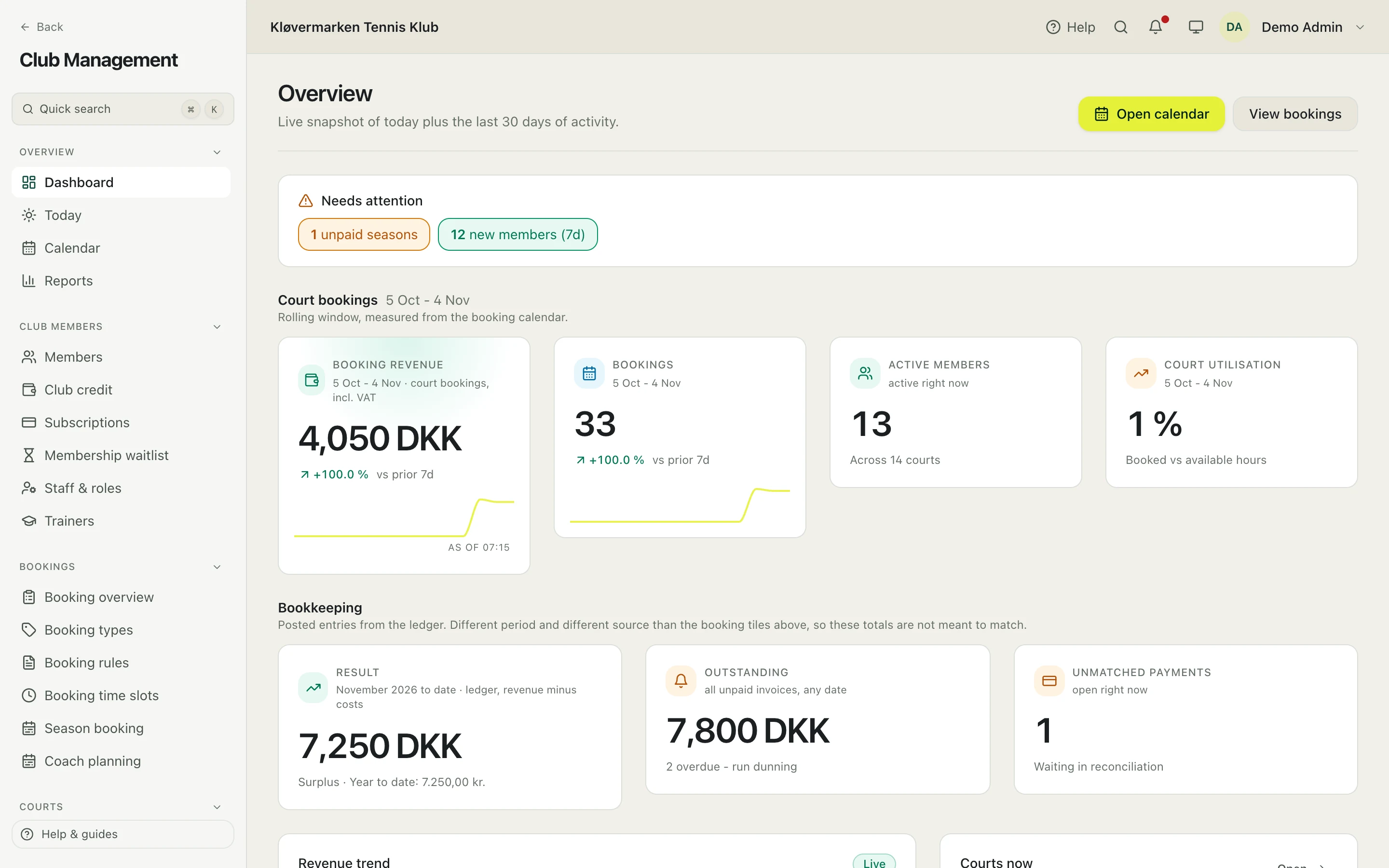
Sound familiar?
What we hear from club boards, and what changes when the club runs on Racketr.
The treasurer types every payment in twice.
- Every booking, membership, class and voucher is posted to the ledger as it is paid, with VAT. The cashier reconciles the bank instead of retyping it.
Members call the board to ask if a court is free.
- Members see free courts and the price in the app, on the web or on the screen in the hall, and book and pay themselves.
Dues reminders go out by hand, one e-mail at a time.
- Invoices go out with gap-free numbers and the reminders follow in three steps by themselves. Members pay in the app.
Our booking system looks like it did in 2005.
- A clean admin with a preview of the consequences before every change that cannot be undone, and an app members actually open.
Everything a club runs, switched on module by module.
A flat monthly subscription based on the modules a club switches on. No commission on bookings or membership payments.
- Courts and bookings
-
A court calendar with nine rule types, pricing windows, season bookings with split-rate billing and a court waitlist with timed offers.
Club evenings, a public club page on the club's own subdomain and a booking widget for the club's website.
- Members and money
-
Members, membership types and member numbers, families, dues with three reminder steps, invoices and credit notes with gap-free numbering.
Club credit with refund rules the club sets, vouchers and the club shop. Hosted payments through NETS Easy, with automatic card renewal.
- Play and training
-
Programs and classes with a waitlist and attendance, the coaches' schedule with swaps and a payroll export, leagues, tournaments and club rankings.
Announcements in the app, by e-mail and push, with a count of who receives them before they go out.
- Running the club
-
Roles for owner, admin, operator, cashier and trainer with two-factor sign-in, an audit log and a preview of the consequences before every change that cannot be undone.
GDPR export and anonymisation, a reports hub and an admin manual in Danish and English.
Court lighting that follows the calendar is built and ready for a pilot; it is not yet live at a club.
From the calendar to the ledger, without retyping.
One booking, followed through the day: what the club sets, what the member sees, what the cashier finds.
-
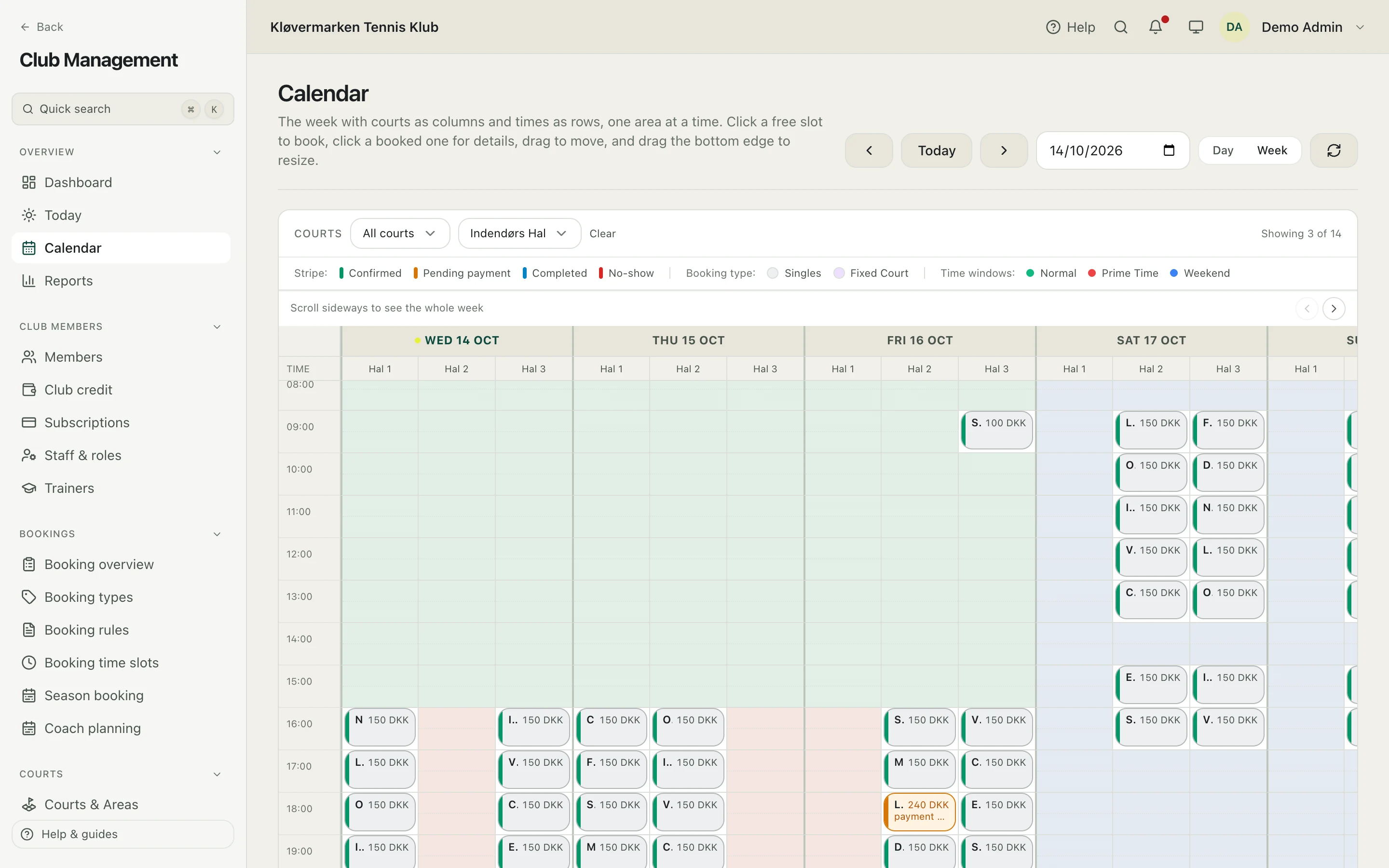
The calendar
Opening hours, closures and rules decide what a member can see and book.
-
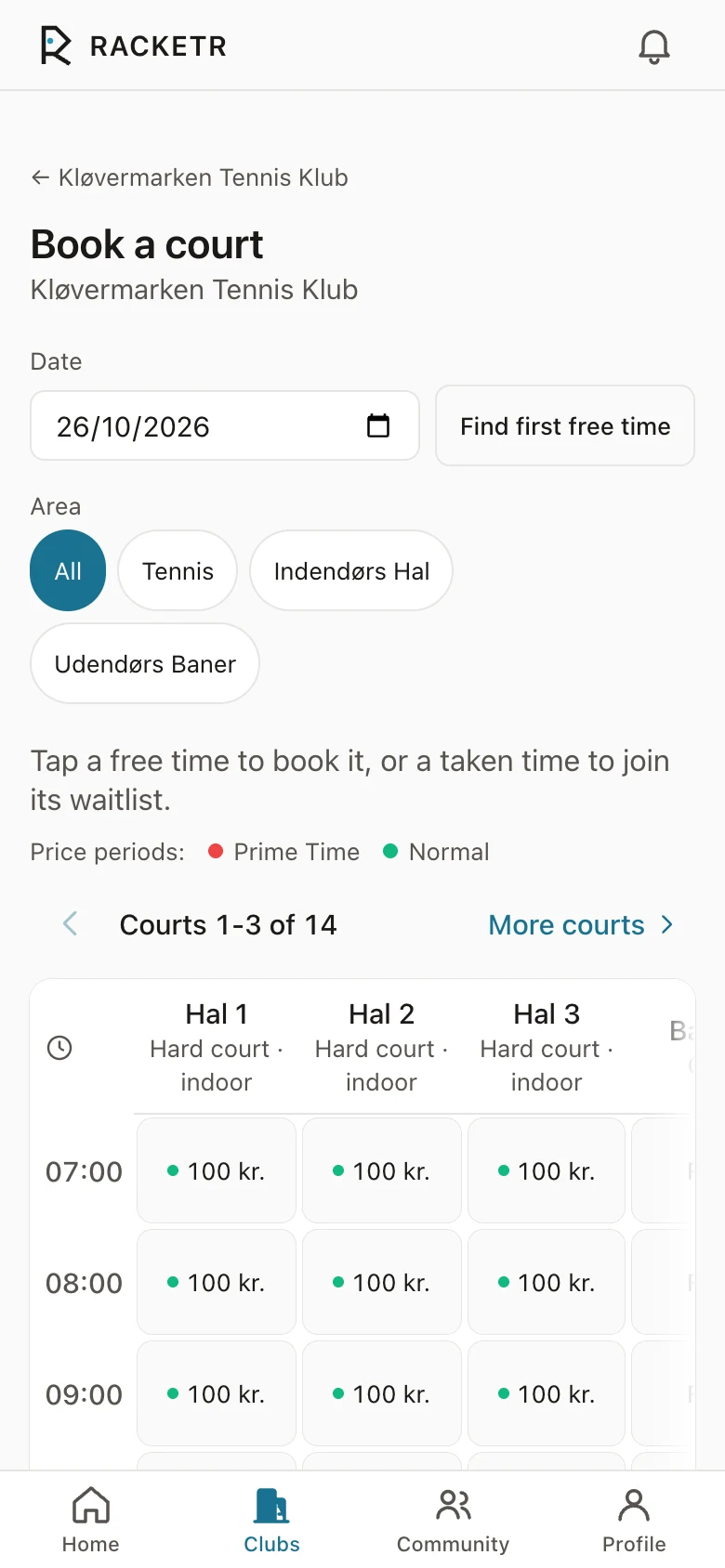
The booking
The member picks the court and sees the price before paying.
-
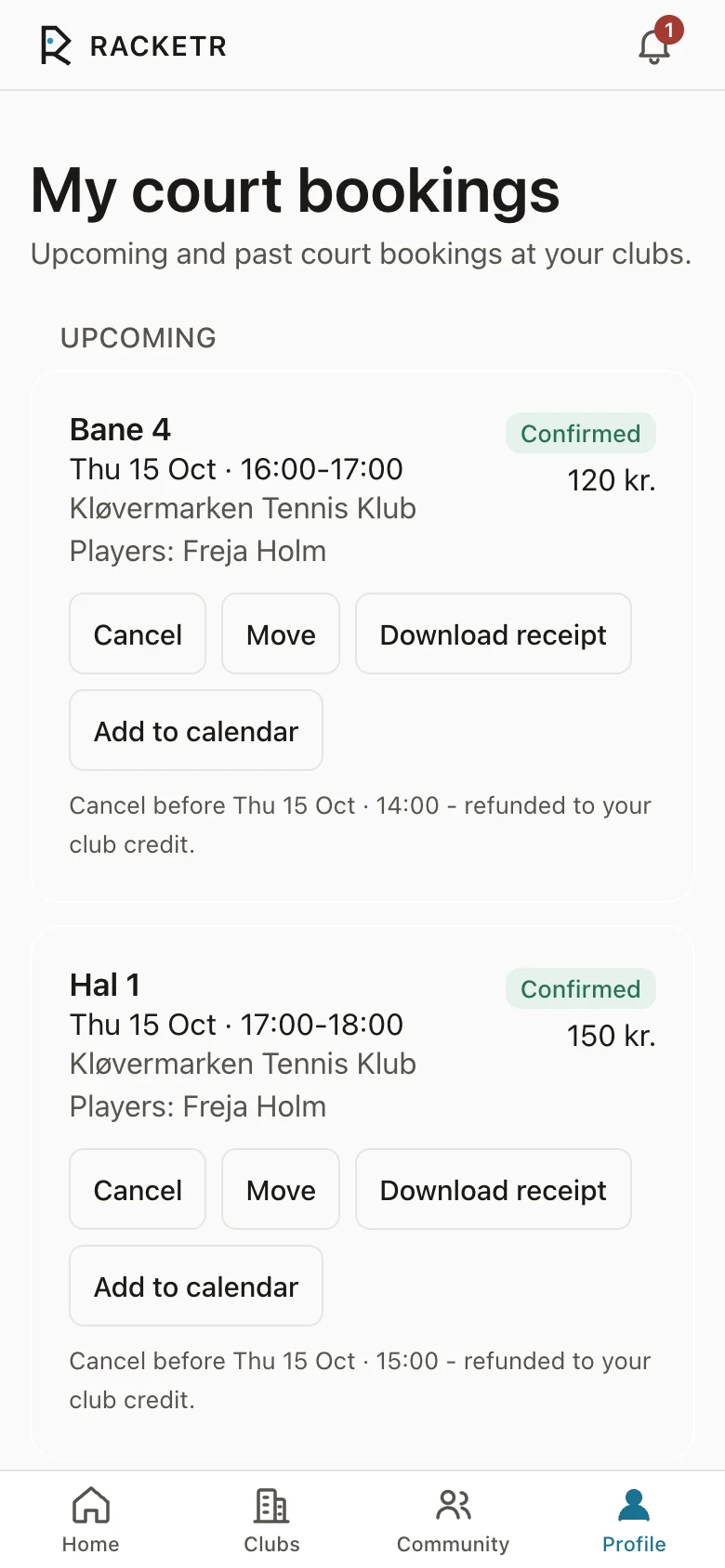
The payment
Card or club credit through the club's own NETS agreement; the receipt lands in the app.
-
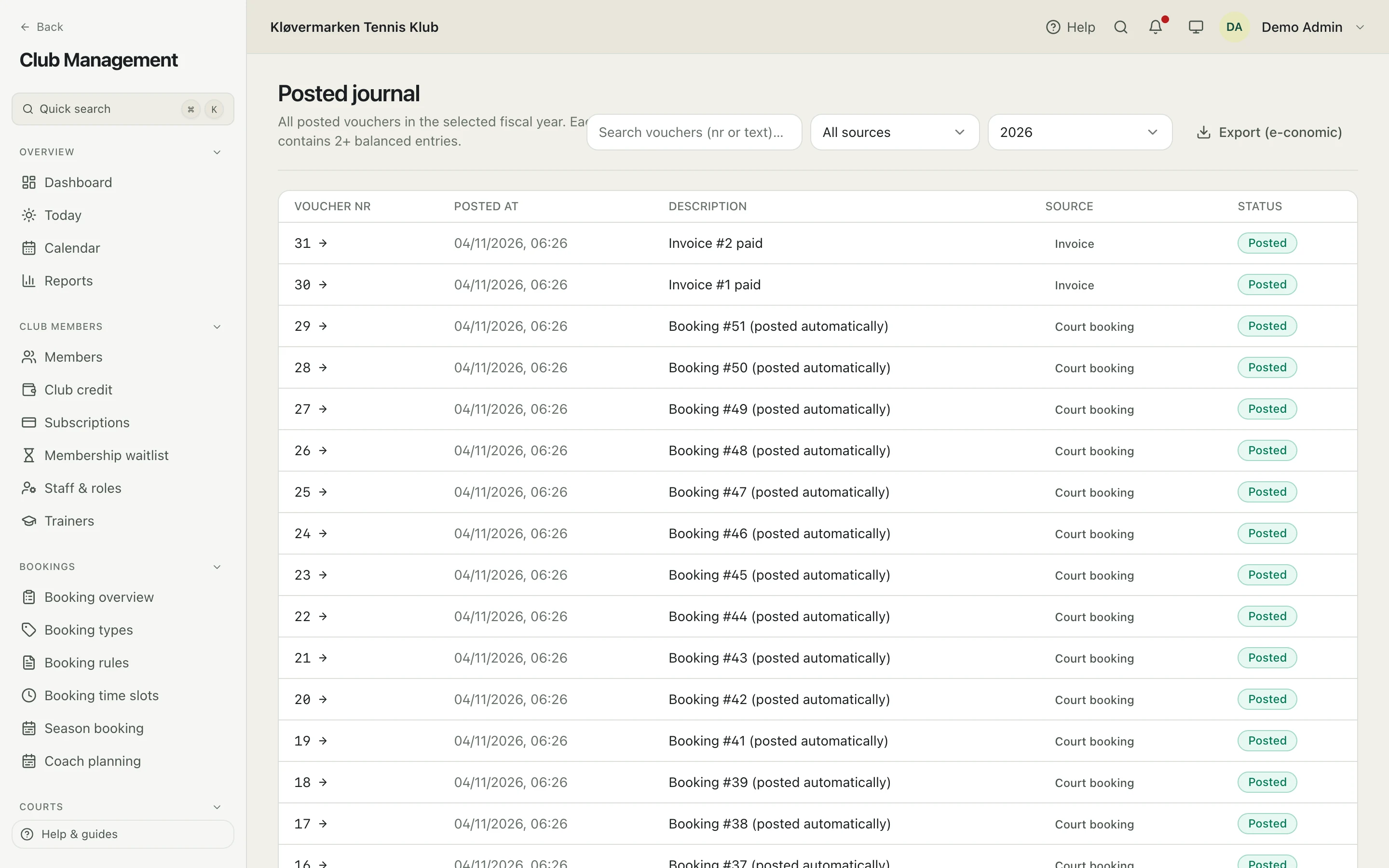
The ledger
The posting is already in the journal, with VAT, when the cashier opens it.
Accounting that closes the year, not only the payment.
Every booking, membership, class and voucher is posted to the ledger as it is paid. The cashier reconciles; the board closes the period with a preview of what it locks.
- Chart of accounts, posting journal and VAT codes.
- Period and year-end close with a preview of the consequences before anything is locked.
- Profit and loss and a trial balance on screen, for any fiscal year.
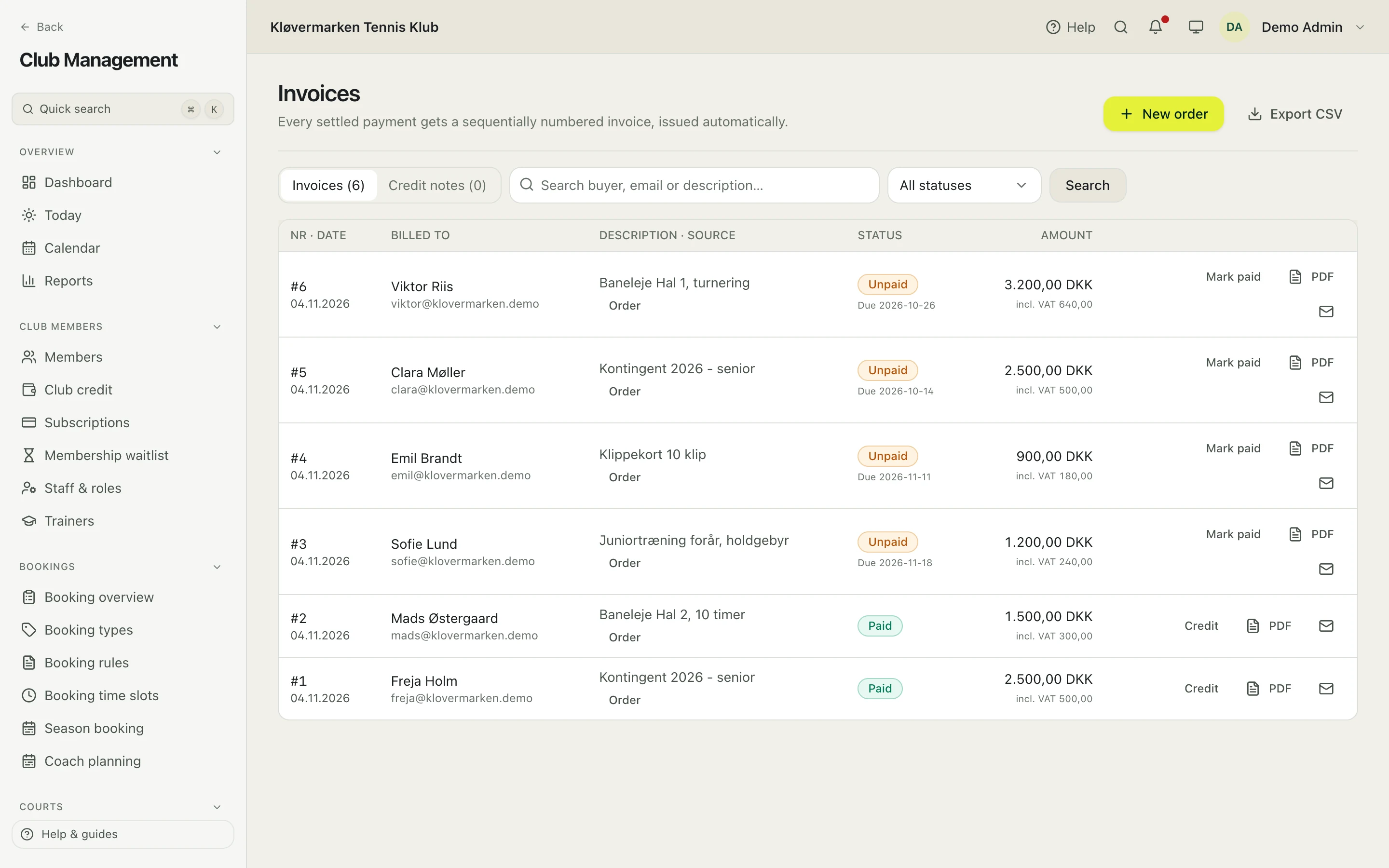
- Invoices and credit notes with gap-free numbering; dues in three reminder steps.
- Bank import and reconciliation; export to e-conomic.
- Members see their own invoices, statement and club credit in the app, and pay open invoices there.
Built with Danish bookkeeping in mind, so the auditor gets numbered documents, not screenshots.
Members and dues, without the paper chase.
One member register for the whole club: who is a member, on which membership, what they owe and what they have paid.
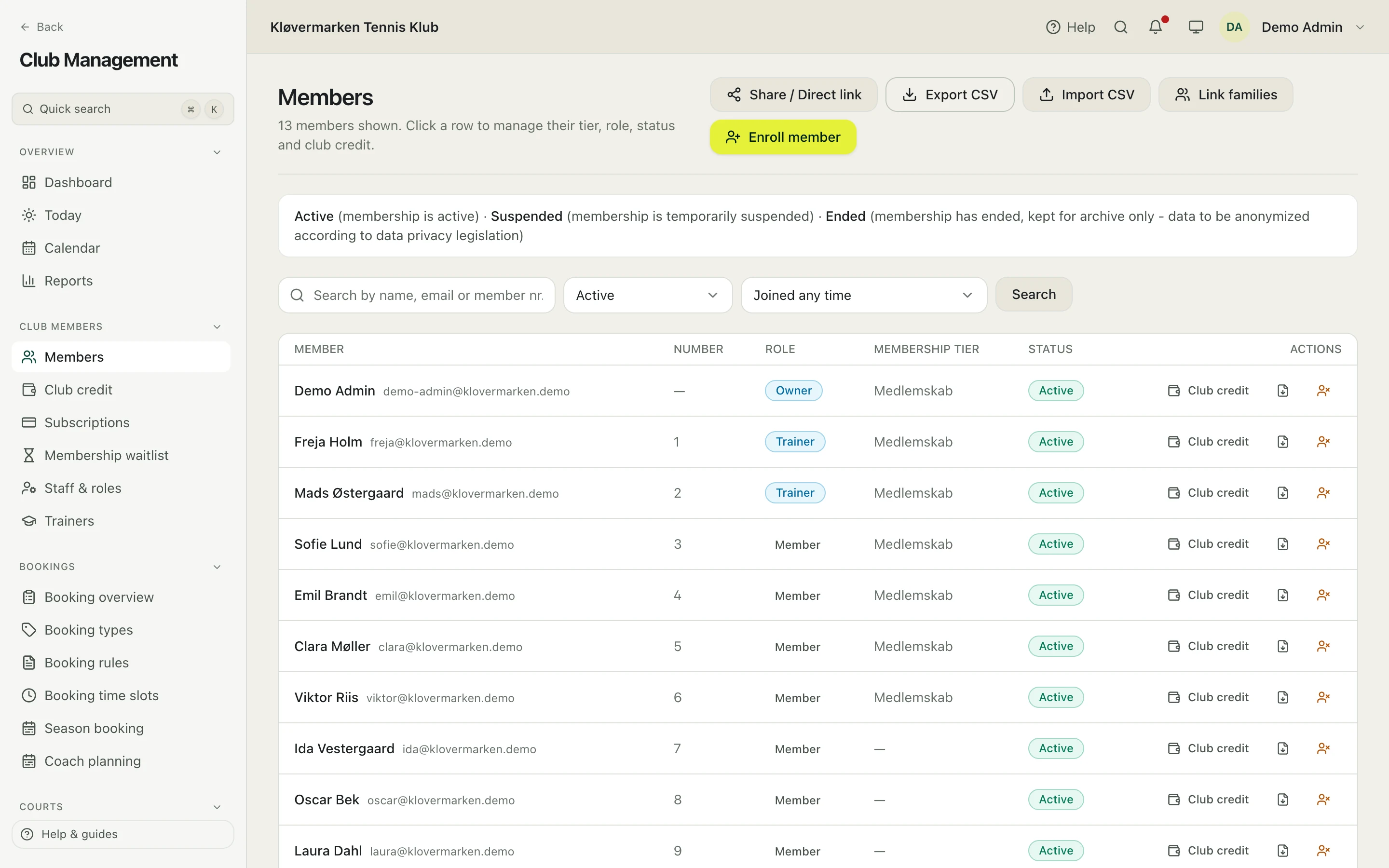
- Membership types with prices, age groups and families.
- Online sign-up with automatic card renewal through NETS.
- A membership waitlist that shows each person their place in line.
- Invoices with gap-free numbers and reminders in three steps.
- Club credit, vouchers and a club shop.
- Announcements by app, e-mail and push, with a count of recipients first.
The hall keeps running when the board goes home.
A walk-in books at the screen in the hall, pays on their own phone, and the money lands in the club's own agreement.
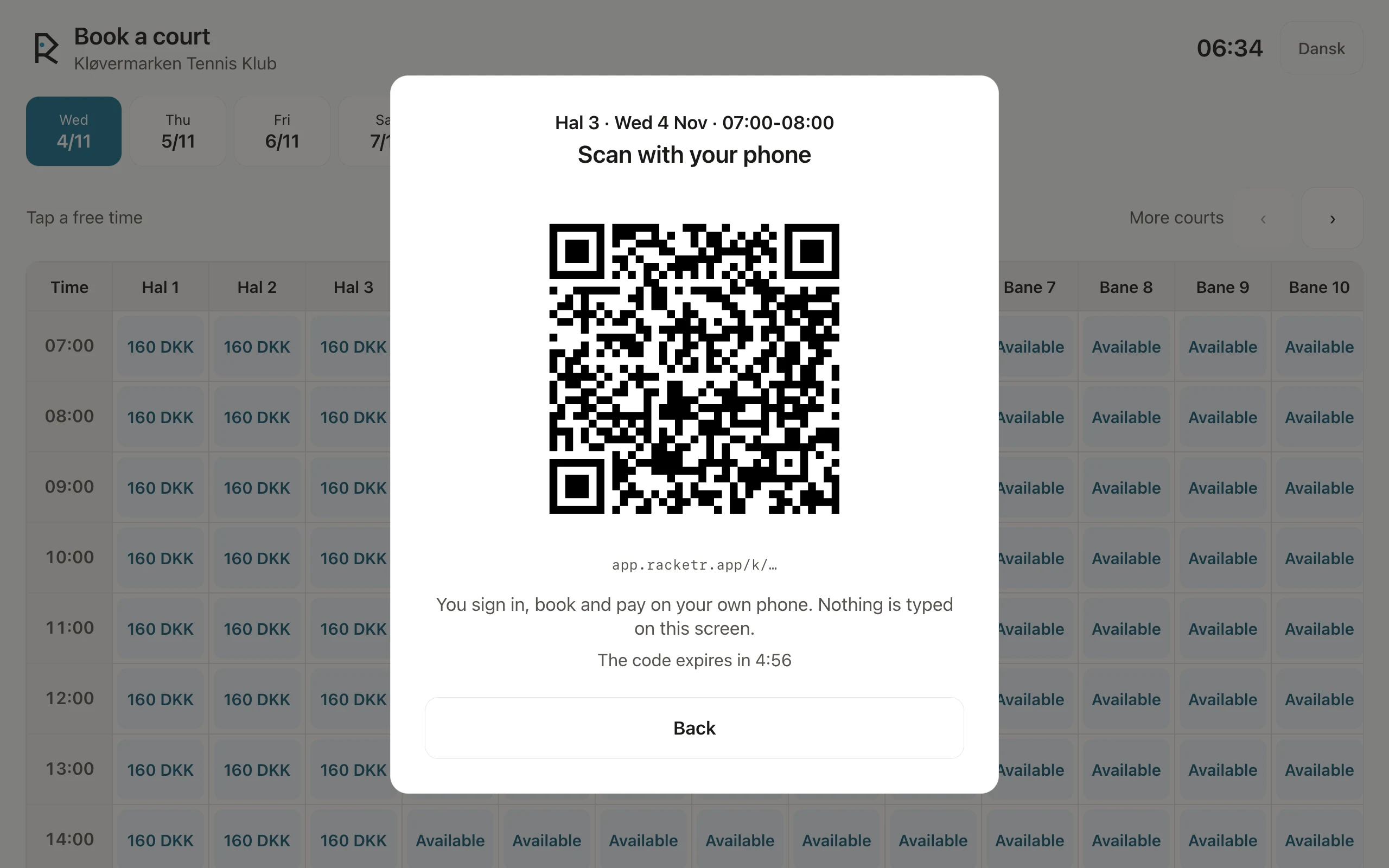
A kiosk without a keyboard
The member taps a free time and scans the QR code. Sign-in, booking and payment happen on their own phone; nothing is typed on the screen and it holds no session.
NETS Easy and MobilePay
Card, MobilePay and club credit, through the club's own payment agreement. The money never passes through us, and refunds follow the club's rules.
Light that follows the calendar
On five minutes before a booking, off five minutes after, through a smart relay in the club's switchboard beside the existing controls. Built and ready for a pilot; not yet live at a club.
Bring the whole club with you.
Import, with families. Members, member numbers, membership types and families come in from your current system's export through the CSV importer in the admin; nothing is retyped.
Bookings and the books too. Season bookings, open invoices and the accounts come over from the old system's export; we prepare that part of the move with the club.
Rehearse before go-live. The migration runs on a copy first, so the board sees members, balances and invoice numbers before the switch date.
Keep the paper trail. Invoice numbering stays gap-free from the first day on Racketr, and the old numbers stay on the imported documents.
Kløvermarkens Tennis Klub (14 courts) is rehearsing its move to Racketr and plans to go live in January 2027.
Register your clubOne system, the right view for each of you.
Roles with two-factor sign-in decide who sees and changes what, and every change by staff lands in the audit log.
- The board
- The overview: bookings, revenue, court use and what needs attention, without asking anyone.
- The manager
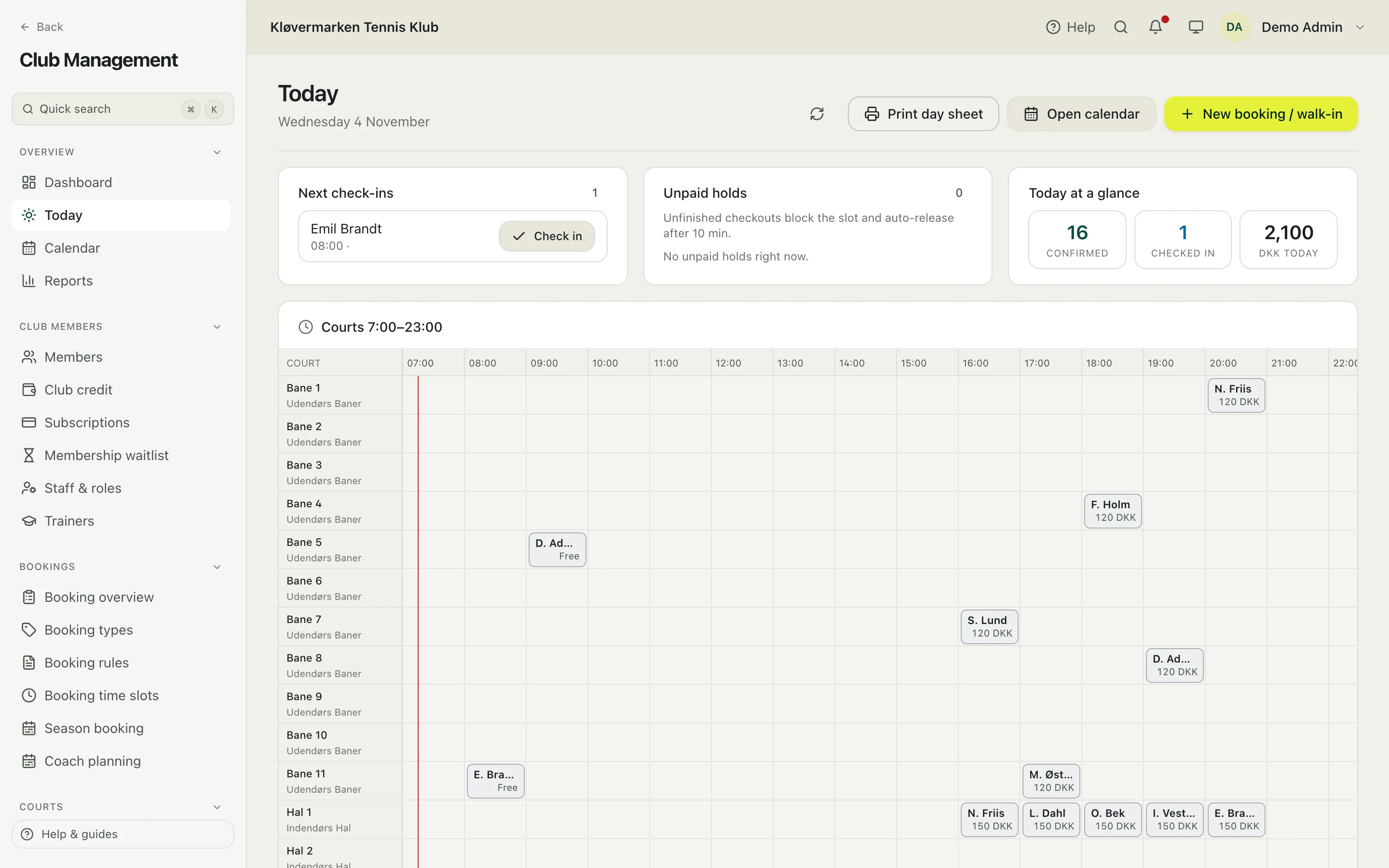
- The calendar, rules and prices, season bookings and today's desk with check-ins and walk-ins.
- The treasurer
- Invoices and reminders, bank reconciliation, VAT and the year-end close.
- The trainers
- Their schedule and attendance, swaps between trainers and the hours for payroll.
And the members get an app they want to open: courts, matches, rankings and their invoices on iPhone and the web, with Android on its way.
See what members getQuestions clubs ask first
What does it cost?
Players and communities pay nothing. A club pays a flat monthly subscription based on the modules it switches on: booking, memberships, finance, shop and so on. There is no commission on bookings or membership payments; what the members pay is the club's.
Can we switch from our current system?
Yes, from any system. Members, member numbers, membership types and families come in through the CSV importer in the admin; bookings, open invoices and the books are moved from the old system's export, prepared with the club. The migration is rehearsed on a copy first, and invoice numbering continues without gaps.
Do members have to use the app?
They can use the iOS app, the web app, or soon the Android app; the club's staff can also book and register on a member's behalf at the desk.
Which payment providers are supported?
NETS Easy is live in production, with automatic card renewal for memberships. Stripe and MobilePay are supported as well. The money goes to the club's own agreement, never through us.
Can Racketr control the court lighting?
Light that follows the calendar is built and ready for a pilot: on five minutes before a booking, off five minutes after, through a smart relay in the club's switchboard. It is not yet live at a club.
Who owns the data?
The club. Every member can export their own data, the club can export or anonymise a member, and every change by staff is in the audit log.
Is there documentation?
An admin manual in Danish and English covers courts, pricing and rules, members, programs, training, money and finance, and communication.
Which sports?
Tennis, padel and squash, each with its own scoring, court types and rankings.
Tell us about your club.
Send the club's details and we come back with a demo and a migration plan. No commitment.